Background
Since 2019, I'd been running a personal site called yamotty.tokyo. Before that (from 2016), I was hosting on GitHub Pages. But I digress.
The yamotty.tokyo setup used Notion for writing and Wraptas — a web UI wrapper — for publishing. It was extremely low-maintenance; as long as you could use Notion, it was a breeze to operate.
The trade-off for that low overhead was a set of nagging issues:
- Total service costs ran around ¥1,500/month
- UI flexibility was constrained by Notion
- Writing environment was also locked into Notion
- I no longer live in Tokyo, yet I was still using a
.tokyodomain - My content was scattered across multiple platforms, and I wanted to automatically aggregate it all into a single portfolio
Vibe coding — building things through feel and intuition — was trending at the time. It seemed like a perfect opportunity to solve these problems while trying the approach myself, so I decided to rebuild (or rather, have it rebuilt) from scratch.
Project Goals
- Reduce site costs to zero
- Build a UI I could actually be satisfied with
- Host a static site on GitHub + Vercel for easy operations
- Change the domain →
yamotty.me - Automatically aggregate updates from external sites (Podcast, note, Shizukana Internet)
- Include one tech component I'd never used before → decided on GitHub Actions
- Release within 3 days of starting
The longer a project drags on, the more motivation fades — so I set myself a hard deadline of 3 days of summer vacation to finish it.
Preparing for Vibe Coding
Vibe coding is, by definition, coding by intuition — if you go in bare-handed, quality gets patchy.
Having done some Vibe coding for internal tools at my company, I'd developed a sense for how to get LLMs to produce consistently high-quality output. Concretely, these were my key points:
- Thoroughly write out requirements docs, design specification docs, and a project management sheet upfront
- Prepare sample UI images to show what you want
- Build something rough that works first; if it's way off from the vision, throw it all away
- When starting over, update the documentation to capture where it diverged from the vision
Here's what the project directory looked like — you can see a lot of documentation inside /doc:
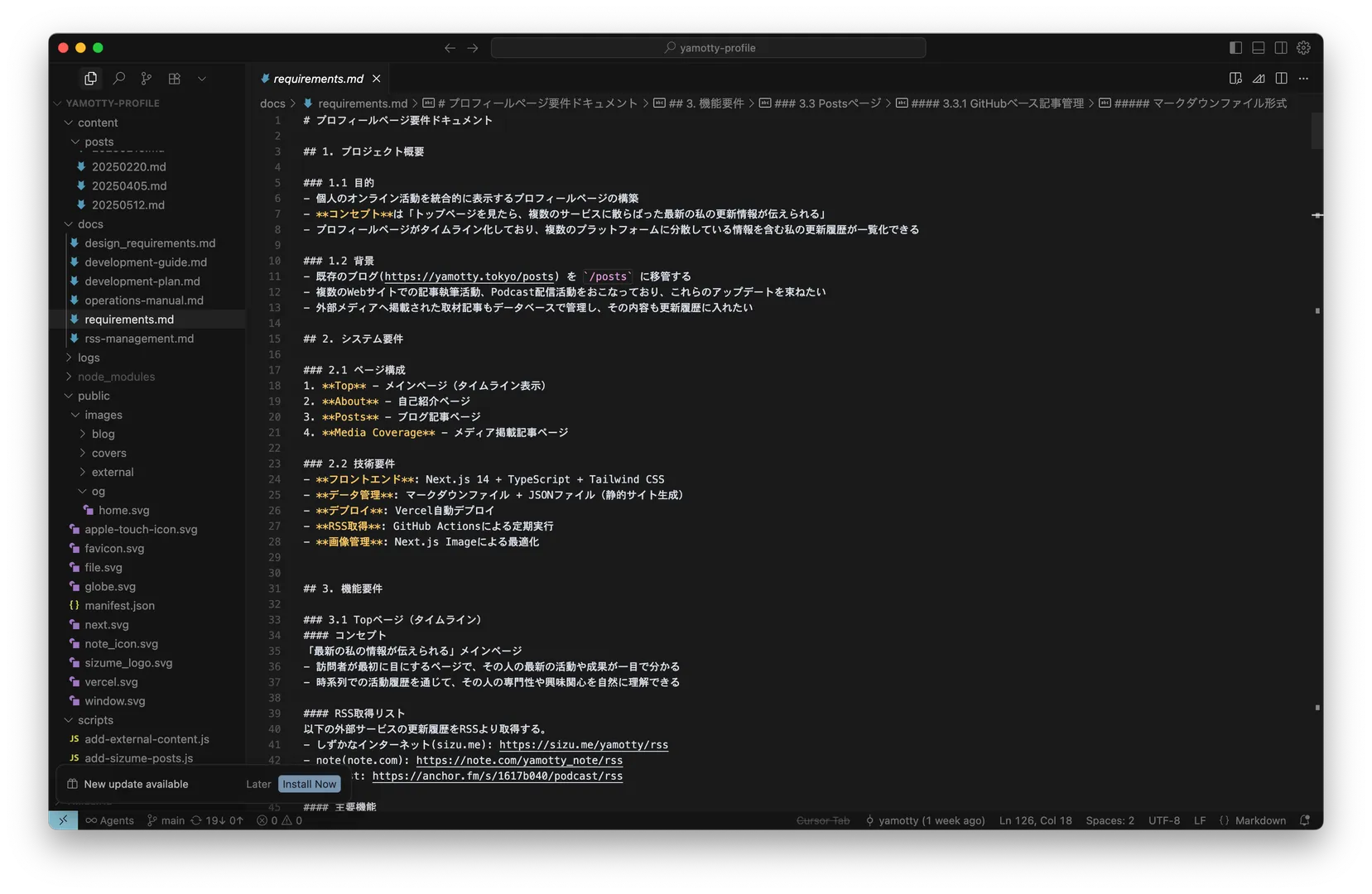
In this project, I went through the cycle of building from docs, discarding, and incorporating feedback twice. What you're looking at now is the product of the third iteration.
The opening of the spec document stated the project goals like this:
## 1. Project Overview
### 1.1 Purpose
- Build a profile page that integrates personal online activity in one place
- **Concept**: "Visit the top page and get my latest updates from across multiple services, all in one place"
- The profile page is a timeline that aggregates my update history from various platforms into one view

### 1.2 Background
- Migrate the existing blog (https://yamotty.tokyo/posts) to /posts
- I write on multiple websites and publish a podcast — want to bundle these updates
- Also want to surface press coverage and interviews in the update history
Development Setup and Environment
The site architecture is defined in the spec doc. From that, I had the LLM think through the technical requirements:
## 2. System Requirements
### 2.1 Page Structure
1. **Top** - Main page (timeline view)
2. **About** - Introduction page
3. **Posts** - Blog article page

### 2.2 Technical Requirements
- **Frontend**: Next.js 14 + TypeScript + Tailwind CSS
- **Data management**: Markdown files + JSON files (static site generation)
- **Deployment**: Vercel auto-deploy
- **RSS fetching**: Periodic execution via GitHub Actions
- **Image management**: Optimization via Next.js Image
With the overall architecture and tech requirements this simple, the dev environment was equally minimal:
- Cursor
- GitHub Actions
- Vercel
What I actually did throughout this project was almost entirely: chat with Cursor in Japanese, and hand over images with instructions to use them. The old blog content was pulled via the Notion API using a throwaway script the LLM wrote for me (there were a few spots where Notion's block model got in the way and things didn't come through cleanly, but I'll deal with those eventually).
The Upside
The beauty of Vibe Coding is that all you need to do is talk to an LLM like you would a developer, and the code gets written. You can do things you couldn't do before, and you can build faster.
Anyone with even a little product development experience — like me — stands to benefit enormously.
The Downside
In exchange for those benefits, you let go of the idea of fully understanding and owning the codebase. (Some people won't do that, but then you're giving up a lot of the upside.)
In this project, I understand almost nothing about the underlying code structure or conventions.
In a normal coding workflow, when something breaks, you read the code, interpret what's happening, and figure out how to fix the error.
With Vibe Coding when you've had the LLM write a significant amount of code, you give that up. When something goes wrong, your only option is to let the LLM solve everything. If you try to catch up and maintain it yourself, you'll just spend time and stress trying to understand code the LLM wrote — and you won't really be getting the benefits anymore.
This feeling is a bit like when something breaks on a car or some other complex machine, and you just give up trying to fix it yourself and take it to a dealer or repair shop.
Done!
And so — the site that got built is this very site.
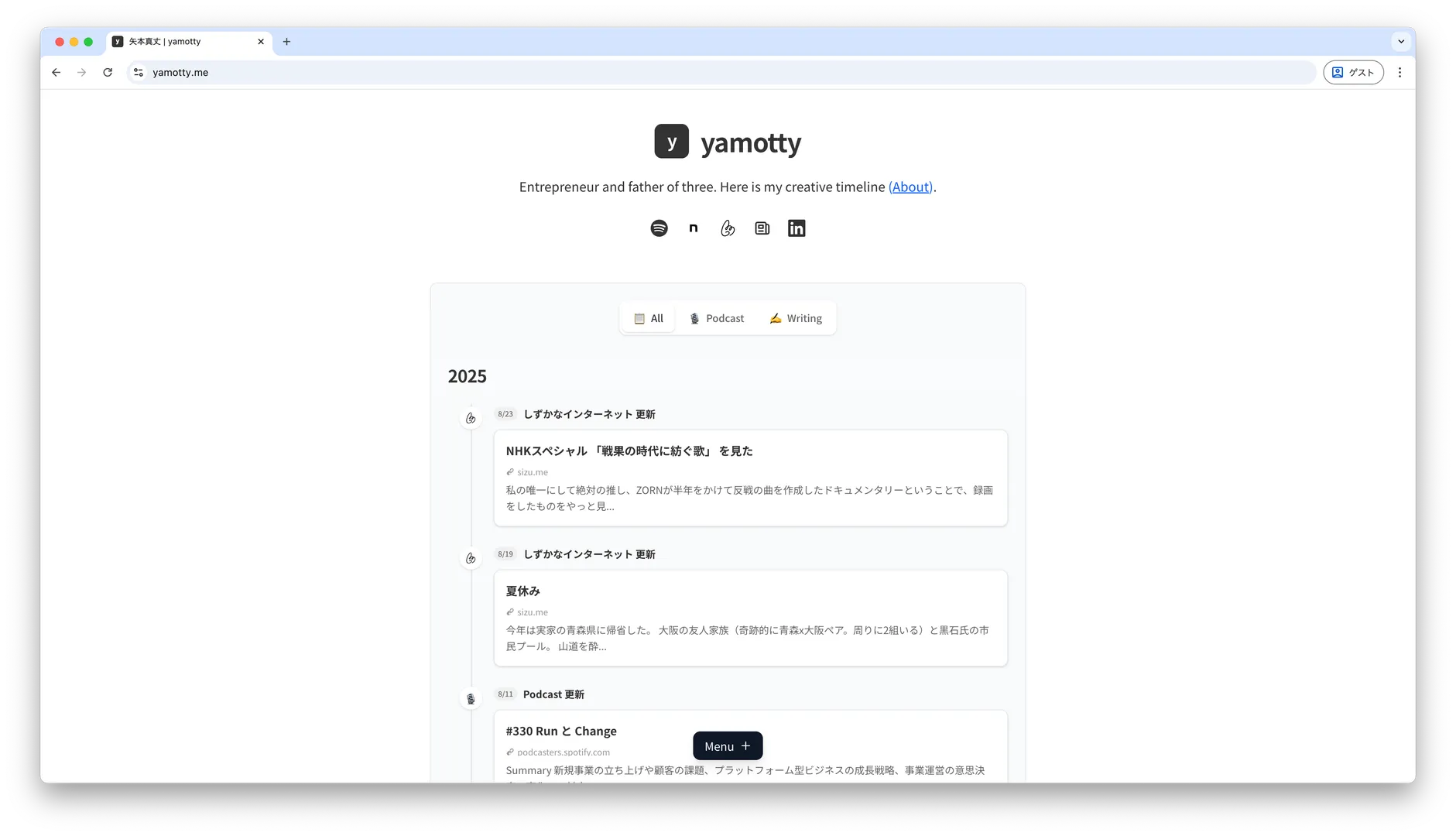
I sweated the details on things like the timeline UI, and I'm genuinely satisfied with how it turned out. The monthly costs are now zero, which is much friendlier on the wallet too.
When you chat with an LLM, it explains its reasoning and what it was thinking as it wrote the code. When bugs appear, it finds and explains the cause. I can't claim to understand everything, but it was educational.
Special Thanks
While looking for UI inspiration, I stumbled across something that made me think "that's exactly it."
It was catnose.me, the portfolio site of Catnose — the developer behind Shizukana Internet (しずかなインターネット, a Japanese writing platform for reflective writing). It's beautifully organized as a timeline, and was precisely what I had in mind. It was a major reference throughout the build.
Catnose and I also recorded a Podcast episode together — check it out.